Your Google Business Profile can easily attract over 200 visitors a day when it’s set up the right way. About 46% of Google searches are local, and 88% of mobile local searches result in action within a day. It means your Google Business Profile plays a big part in how many people find your business.
To attract more visitors to your local business website or Google Business Profile, you need clear, practical steps that work. Completing your profile fully, adding fresh visuals, and replying to reviews can greatly increase how often people find and trust you.
In this blog, you will see seven proven ways to boost your GBP engagement traffic fast. Keep on reading to learn how to turn your profile into a real customer magnet.
Understanding Google Business Profile Visitors and Why They Matter
Visitors to your Google Business Profile are people who come across it on Google Search or Maps. Also, they take actions like looking at your photos, reading your reviews, clicking for directions, calling you, or visiting your website.
These interactions give Google signals that your business is relevant and active. For example, our review of industry data found that 75% of top-ranking pages had complete Business Profile descriptions. It clearly shows how completeness links with stronger visibility.
In your digital ecosystem, these actions build your presence.
A person views your profile → they check a photo or two → they read a review → they click for directions or visit your site.
Each action tells Google: “This business matters and is useful.” That helps boost local search rankings. According to Google’s help pages, businesses with full and updated profiles are more likely to appear in local results.
Here’s why visitor activity on your profile makes a difference:
- A high number of profile views and clicks helps you get more views on GBP and grows your visibility.
- When visitors engage (calls, direction requests, website visits), Google sees that and boosts you in local search.
- With better ranking and more engagement, you’ll get increased foot traffic and conversions.
- Strong visitor metrics play a major role in Google Business Profile visitor optimization. Also, it improves your chances of appearing in the “map pack” and local listings.
If you focus on these visitor interactions and track them, you will be aligning your profile with real-world business outcomes. They are mostly, more people discovering your business, more local traffic, and more conversions.
The 7 Core Strategies to Attract More Google Business Profile Visitors
Attracting more visitors to Google Business Profile isn’t about one tactic; it requires a complete optimization plan. A powerful addition to this plan is integrating AI Search Optimization strategies to capture more intent-driven searches.
The first two: filling out your profile and adding strong visuals. Then you will add review management, posts, Q&A, consistency across platforms, and data-driven tweaks.
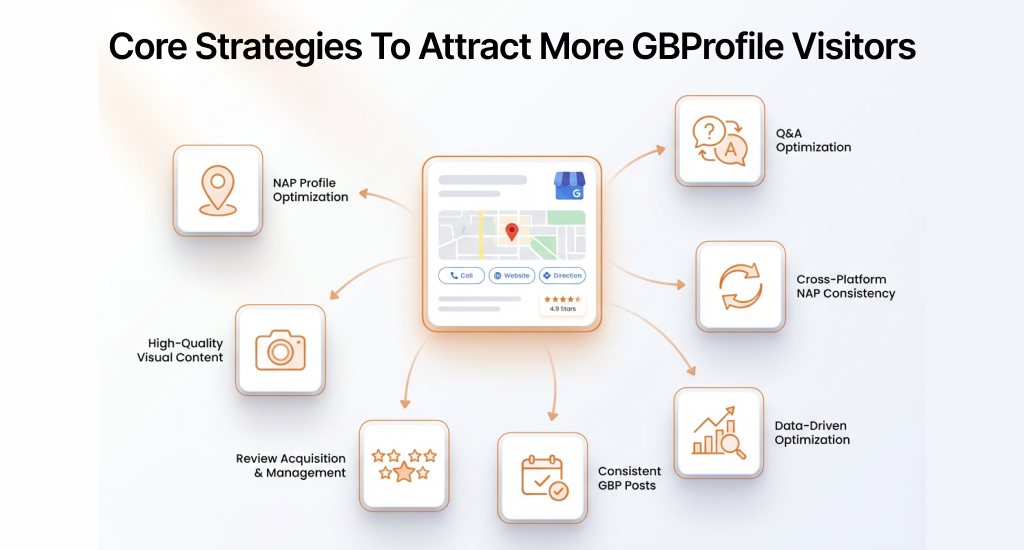
Strategy 1 – Complete Your Profile for Maximum Visibility
Profile completeness is one of Google’s strongest ranking signals for local search. Studies show that incomplete profiles lose around 70% of potential visibility compared to fully optimized ones. Each missing detail reduces your chance to appear in front of local customers.
Essential Profile Elements to Complete
- Business Information: Make sure your Name, Address, and Phone (NAP) match your website and other listings. You should select both primary and secondary categories that fit your business best. Don’t forget to add service areas, accurate business hours, and any special hours for holidays or events.
Also, adding insurance information to your Google Business Profile can help maintain consistency.
- Business Description Optimization: Write 250-750 characters with natural keywords and local details. Example: “Family-owned Italian restaurant in downtown Seattle serving authentic Neapolitan pizza since 2010. Dine-in, takeout, and catering available.”
- Attributes and Features: You should enable relevant features like Wi-Fi, parking, or accessibility. Add booking links if needed.
Strategy 2 – Leverage High-Quality Photos and Videos
Visual content is the top driver of engagement on Google Business Profiles. Profiles with over 100 photos see 520% more calls and 1,065% more website clicks than profiles with few or no images. Strong visuals make your profile stand out and push visitors to take action.
For deeper guidance on managing visuals and user-generated content effectively, check out our article on How to Add a Picture to a Google Review?.
Which Types of Visual Content Do You Need to Upload
- Product/Service Photos: Display your offerings in high resolution (at least 720px wide). You should update monthly with new products or seasonal items. Use a mix of close-ups, context shots, and lifestyle images.
- Location Photos: Show your exterior, interior, and team. It builds trust and gives visitors a clear sense of your space.
- Action Photos: You should capture services in progress, products in use, or events with customers (with permission).
- Video Content: 30 to 90-second tours, product demos, or customer testimonials increase engagement.
- 360° Virtual Tours: Great for restaurants, hotels, and retail spaces. It boosts engagement time by 200%+.
- Upload Frequency & Specs: Add 5-10 photos monthly, try to refresh seasonal content quarterly. You should use JPG/PNG under 100MB, 16:9 or 4:3 aspect ratio, with a minimum 720px width.
Strategy 3 – Master Review Acquisition and Management
Reviews are the second-strongest local ranking factor after profile optimization. The number of reviews, their quality, how recent they are, and your response rate all affect visibility. Businesses with 50+ reviews and a 90%+ response rate rank much higher in the local pack and attract more clicks, calls, and visits.
How to Get More Google Reviews
You should ask for reviews right after a positive experience, either in person or via email/SMS, within 24 hours.
Send a direct review link (maps.app.goo.gl/[your-profile-id]) and personalize the message by referencing the service or product they purchased. Try to make it easy with QR codes at checkout or in follow-up emails.
Also, you can train staff to request reviews naturally, include links in email signatures and receipts, use post-purchase drip campaigns, and offer incentives within Google’s rules.
How to Respond to Reviews Effectively
- Response Best Practices: You should reply to all reviews within 24-48 hours. Thank customers specifically for positive reviews and invite them back. For negative reviews, acknowledge concerns, apologize if needed, and offer offline resolution. If you feel you are targeted or that people are mistakenly giving you negative or 1-star reviews, then you must respond to these suspicious 1-star reviews professionally.
- Example Responses:
- Positive: “Thank you, [Name]! We’re thrilled you enjoyed our [service/product]. We look forward to serving you again soon!”
- Negative: “Thank you for your feedback, [Name]. We apologize for [issue]. Please contact us at [phone/email] so we can make it right.”
A 90%+ response rate can increase profile views by 35% and improve sentiment in Google’s ranking algorithm. This strategy is important to boost GBP engagement and build trust with potential customers.
Strategy 4 – Publish Consistent Google Business Profile Posts
Google Business Profile Posts act like mini-ads that keep your profile fresh and engaging. Regular posts show Google your business is active and relevant, which also helps improve local search rankings and visibility.
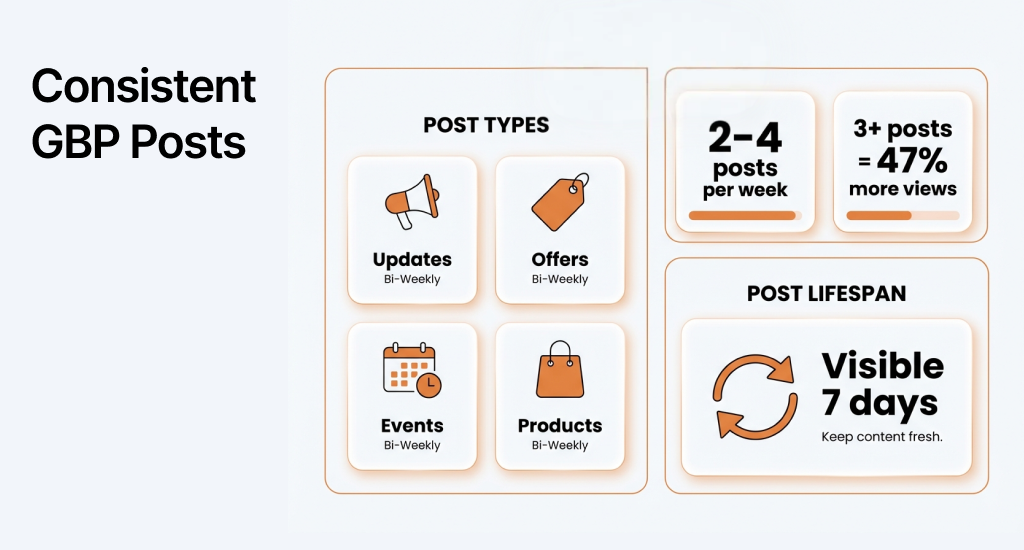
What to Post on Your GBP (Google Business Profile) and How Often?
- Post Types and Frequency:
- Updates (weekly): Share business news, new services, achievements, or behind-the-scenes content.
- Offers (bi-weekly): Highlight promotions, discounts, or limited-time deals with clear CTAs and expiration dates.
- Events (as applicable): You can announce workshops, seasonal activities, or special hours.
- Products (for retail): Try to feature items with pricing, descriptions, and “Buy” CTAs.
- Optimal Posting Schedule: 2-4 posts per week. Businesses posting 3+ times weekly see 47% more profile views.
- Post Optimization: You should include high-quality images, 100-300 characters with primary keywords, clear CTAs like “Book Now” or “Learn More,” and link to relevant landing pages. These posts remain visible for 7 days, so maintain consistency for maximum impact.
Regular posting helps you boost GBP engagement and generate organic visits to Google Business Profile.
Strategy 5 – Optimize Your Q&A Section Proactively
The Q&A section is a hidden opportunity to boost visibility. Answering common questions with clear and keyword-rich responses not only helps Google understand your business but also gives potential customers quick answers. As a result, it can improve their experience and trust.
These improvements work even better when matched with a strong cross-platform presence, supported by Social Media Marketing services.
Actionable Tactics
- Seed Strategic Questions: You should create and answer 8-10 FAQs yourself. Use keywords naturally, e.g., “Do you offer same-day delivery in Seattle?” Provide detailed and helpful answers of 50-150 words each.
- Common Question Categories:
-
- Services offered and pricing
- Hours and availability
- Appointment or booking process
- Payment methods accepted
- Parking and accessibility
- Safety measures or COVID policies
- Ongoing Management: Check for new questions daily and respond within 24 hours. Try to update answers as your business changes and flag inappropriate questions for removal.
- SEO Benefit: Q&A content is indexed by Google and can rank for long-tail searches. It can help you improve GBP visibility and grow your Google Business Profile audience.
Strategy 6 – Maintain NAP Consistency Across the Web
Citation consistency, having the same Name, Address, and Phone (NAP) on every online directory, is a major trust signal for Google’s local algorithm. Inconsistent information can confuse search engines and lower your local ranking by 20-40%.
Implementation Steps
- Audit Current Citations: You should check your listings using tools like Moz Local or BrightLocal, or do manual searches on Google. Try to focus on top directories like Yelp, Facebook, Apple Maps, Yellow Pages, and industry-specific sites. Note formatting differences, like St. vs Street or Suite vs Ste.
- Standardize NAP Format: Choose one consistent format and apply it everywhere. You should make sure it exactly matches your Google Business Profile. Include suite/unit numbers and use a local phone number if possible.
- Update Inconsistencies: You should claim and correct listings on major directories. You just have to update your website footer, contact pages, and schema markup to match exactly.
- Maintenance Schedule: Audit quarterly and update immediately whenever your business information changes. It will improve GBP visibility and boost GBP engagement.
Strategy 7 – Track Performance with GBP Insights
Data-driven optimization separates high-performing Google Business Profiles from those that remain stagnant. GBP Insights shows how customers discover your business, what actions they take, and which content performs best.
The following information lets you make smarter changes to improve GBP visibility and grow the Google Business Profile audience.
Discovery Metrics:
- How customers find you: direct searches vs. discovery searches
- Top search queries driving traffic
- Visibility in Google Search vs. Maps
Customer Actions:
- Website clicks
- Direction requests
- Phone calls
- Message inquiries
Content Performance:
- Photo views compared to competitors
- Post engagement rates
- Popular times when visitors search
Optimization Process
You should check Insights weekly. Identify high-performing keywords and integrate them into your profile description and posts. Try to track seasonal trends and adjust your content calendar.
Also, you have to compare metrics against competitors to find gaps. Test different post types, CTAs, and visuals. Try to use Insights to refine keywords, posting schedules, photos, and service descriptions. These will help you generate organic visits to Google Business Profile consistently.
Advanced Tactics to Boost Your Local Visibility with Google Ads
Organic optimization is essential for long-term growth, but Google Ads Local Campaigns can give your business instant visibility. Paid promotion works alongside organic efforts. Also, it helps new or competitive businesses attract immediate attention.
Local Campaign Benefits
Google Ads Local Campaigns place your business at the top of local search results and the map pack. You can target specific cities, neighborhoods, or demographics to reach the right customers.
These campaigns drive immediate actions like phone calls, direction requests, and website visits. Studies show businesses running local campaigns often see a 50-300% increase in traffic during the campaign period. As a result, it can provide a fast boost while your organic strategy continues to grow.
Budget Considerations
You should start with a modest budget of $300-500 per month and scale based on performance and return on investment (ROI).
Track results carefully to ensure your ad spend is driving meaningful customer actions, rather than just clicks. Try to adjust bids, daily budgets, and targeting as needed to maximize value without overspending.
Setup Essentials
Use location extensions to show your address in ads, enable phone call tracking to measure calls directly from search, and set up conversion measurement. This way, you can see which clicks result in visits or purchases. Proper setup ensures every dollar spent is measurable and impactful.
This calculative approach lets businesses improve GBP visibility and attract high-intent local customers quickly.
Common Mistakes That Reduce Google Business Profile Visibility
Even well-optimized businesses can lose visibility because of simple but critical oversights. Avoid these common mistakes to increase Google Business Profile traffic and attract real local customers.
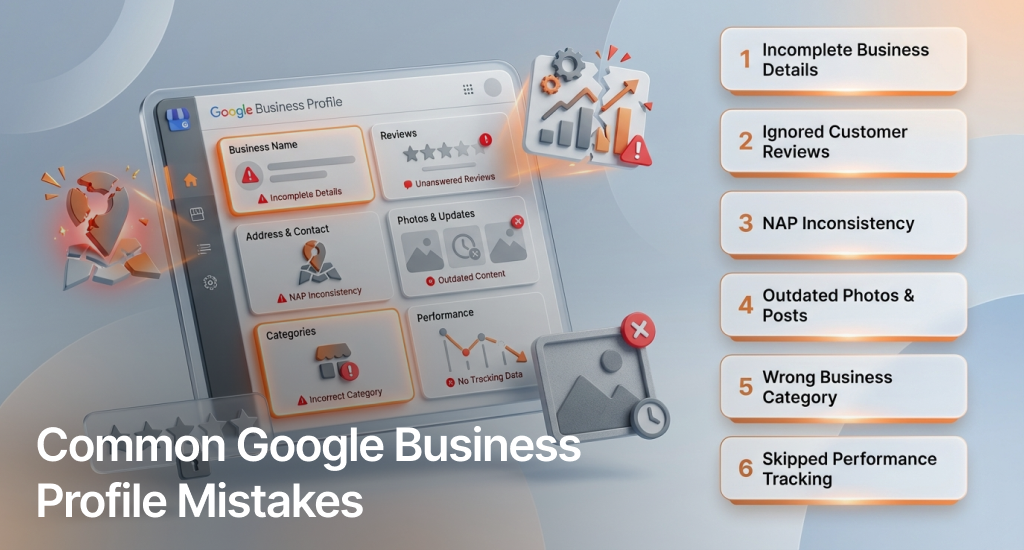
Incomplete Profile Information
Missing categories, hours, or attributes can cause up to a 70% visibility loss compared to complete profiles. Every field helps Google understand your business better and show it in relevant searches.
Ignoring Customer Reviews
Not responding to reviews signals poor customer engagement. Google factors responsiveness into rankings. So consistent replies, both to praise and complaints, can boost trust and local search performance.
Inconsistent NAP Across Platforms
Even minor inconsistencies in your Name, Address, or Phone number confuse Google’s algorithm and weaken citation authority. Try to keep your NAP format identical across directories, websites, and social platforms.
Rarely Updating Photos or Posts
Inactive profiles drop in visibility. Regular photo updates and weekly posts keep your profile fresh. Also, it can prove your business is active and engaging, which encourages higher ranking and click-through rates.
Choosing the Wrong Primary Category
If you select irrelevant or overly broad categories, it can limit exposure to qualified customers. Always try to choose the most accurate primary category that matches your core services for better visibility in target searches.
Not Monitoring GBP Insights
Neglecting GBP Insights means missing out on valuable data, like search trends and engagement patterns. Regular tracking helps refine your keyword strategy and posting frequency for better ongoing performance.
Timeline and Expected Results: When to Expect Real Growth from Your Google Business Profile
Optimizing your Google Business Profile delivers measurable growth, but results build over time. Here’s a realistic month-by-month breakdown of what to expect and how to track progress effectively.
Weeks 1-2: Profile Optimization & Setup
You should complete all core optimizations like accurate business info, categories, hours, photos, and descriptions. These updates can trigger an immediate ranking bump as Google verifies your profile’s completeness and accuracy.
Weeks 3-4: Review & Content Activation
Launch your review request strategy and start consistent posting. As engagement grows, your profile gains trust signals. Also, these can improve visibility in local searches and increase organic interactions.
Month 2: Early Visibility Gains
By this stage, you can expect a 20-40% increase in profile views. Regular photo uploads, responses, and keyword-rich posts begin compounding to improve your local ranking performance.
Month 3: Engagement Growth & Conversion Lift
Consistent effort results in higher engagement, with 50-150% more customer actions, like clicks, calls, and direction requests. Google starts rewarding your ongoing activity with stronger local visibility.
Month 4 and Beyond: Sustained, Measurable Growth
With data-driven adjustments using GBP Insights, your profile maintains steady growth. You should keep refining based on top-performing keywords and posts to sustain higher visibility and consistent conversions.
Success Metrics: Try to monitor profile views, search ranking, customer actions, and conversion rates monthly to measure impact accurately.
End Note
A well-optimized Google Business Profile is your most powerful local marketing tool. Every element, including photos, reviews, posts, and accurate details, directly impacts how often and where your business appears.
Businesses applying these strategies see 50-200% more traffic within 90 days. You should keep your profile updated, track performance, and engage consistently. Your Google Business Profile is often the first impression local customers see. So, make it count every time.