A few words can feel harmless when you type them, but once they’re on Yelp, they stay public. Maybe you wrote in a rush or changed your mind later. Whatever the reason, you want it gone. The good news is, you can.
You don’t need any special tools or technical skills. Just a few clicks can delete your review. The process works a little differently on desktop, iPhone, and Android.
So, today, we’ll explain how to delete a Yelp review you posted in clear and simple steps. We’ll also learn what to do if Yelp won’t let you delete it and how editing can help. Read this blog carefully to sort it out easily.
Can You Delete a Yelp Review You Wrote?
Yes, you can delete your own Yelp review anytime. Yelp lets users remove what they wrote under its review deletion policy. It helps fix mistakes, protect privacy, or remove something you regret.
Yelp follows the Consumer Review Fairness Act (CRFA), so businesses can’t pressure customers to delete reviews, and this law also guides ethical practices in Local Branding strategies that protect authentic customer feedback.
Yelp’s Review Deletion Policy
Yelp lets you delete a review you wrote yourself. It is called user deletion and removes it from your profile and the business page. Yelp can remove fake or misleading posts, which ties closely to maintaining credibility, an area also improved through Local SEO methods that strengthen business trust and visibility online.
Edit Vs Delete Yelp Review
You can either delete or edit a review. Editing works when you want to fix mistakes or add updates. Deleting is better when the review is for the wrong business, contains private info, or you simply regret posting it.
Sometimes, editing is smarter than deleting, especially if your feedback affects your local ranking. Our insights into “Top Marketing Mistakes Local Service Businesses Make” explain how online reputation directly influences customer perception.
Time Limitations & Visibility Timeline
There’s no time limit for deletion. Removing a review shows up on your profile almost immediately. The business page may take a few hours to update because of caching. This small delay is normal and does not affect the removal.
What Happens After You Delete
After deletion, your total review count drops by one. The review disappears from both your profile and the business page. Yelp does not notify the business, so the removal is private. You can always write a new review later if your opinion changes.
How to Remove Yelp Review (Mobile & Desktop) in Easy Steps
Removing a Yelp review is easier than it looks. Whether you use a computer or a phone, you can take it down quickly from your Yelp profile. You can follow these steps carefully to know how to delete a Yelp review you posted on desktop or mobile.
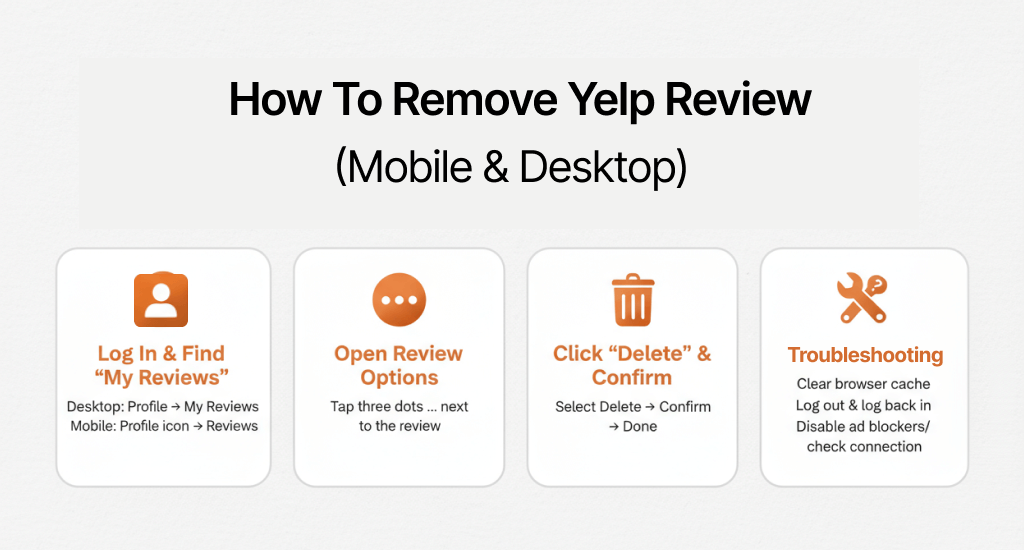
Log In & Find “My Reviews”
Start by logging into your Yelp account on desktop or mobile. After signing in:
- On the desktop, click your profile picture, then select “My Reviews”.
- On mobile, tap the profile icon, then tap “Reviews”.
It will show all the reviews you posted, and they are ready to manage.
Open Review Options (three-dot / ellipsis)
Next, locate the review you want to remove. Click the three dots (ellipsis) next to it. It opens review options where you can choose to edit or delete. Screenshots highlight exactly where the ellipsis is on desktop and mobile.
Click “Delete” and Confirm
Select “Delete” from the menu. Yelp will ask you to confirm. Click “Yes” to remove the review. It disappears from your Yelp profile immediately, and the business page updates shortly after. Annotated screenshots guide every click so you won’t miss a step.
Troubleshooting (Desktop)
Sometimes deletion may fail because of small issues:
- Browser cache: >Clear cache in Chrome, Firefox, Safari, or Edge.
- Session/logout errors:> Log out and log back in to your account.
- Network/ad-block conflicts:> Disable ad blockers or check your connection.
If you follow these steps carefully, you can remove a Yelp review easily, and while you’re optimizing online visibility, our AI Search Optimization service helps ensure your business listings perform better in AI-driven local search results.
Delete Yelp Review on iPhone / Android
Deleting a review on your phone is fast once you know the path. You can remove any review from your Yelp app on iPhone or Android. Follow the steps below, with tips for different OS versions, so you don’t get stuck.
iPhone (iOS 16/17/18)
Open the Yelp app and go to your Profile. Tap Reviews to see all posts. You should find the review, tap the three dots (…), then select Delete. Confirm when prompted.
- iOS 16: Menu shows as a small pop-up.
- iOS 17/18: Menu slides up from the bottom.
Screenshots or GIFs for each step make it easier to follow.
Android (12/13/14)
Open the Yelp app and tap your Profile. Go to Reviews, select the review, tap the ellipsis (…), and hit Delete. Confirm to remove it.
- Android 12: Ellipsis is at the top-right of the review.
- Android 13/14: Ellipsis may appear as a vertical three-dot menu.
Annotated visuals can help you guide each click clearly.
Mobile App vs Mobile Browser
If the app UI looks different or doesn’t show options, open Yelp in your mobile browser. Steps are similar: Log in → Profile → Reviews → Delete → Confirm. It works on both iOS Safari and Android Chrome.
Troubleshooting (Mobile)
Some issues may block deletion:
- App update required: You should make sure the Yelp app is current.
- Force-quit/cache clear: Restart the app or clear cache if buttons don’t respond.
- Re-auth / 2FA issues: You can log out and back in, or complete any verification prompts.
Managing your Yelp reviews through mobile apps is simple, but to attract new users through mobile search, your business should focus on Social Media Marketing campaigns that boost engagement and visibility.
How to Edit Your Yelp Review Instead of Deleting
Sometimes fixing a review is better than removing it. You can edit Yelp review text, change star rating, or update details about your experience. It helps keep your feedback accurate and fair for the business and future readers.
When Editing Is Better
Editing works best when your situation changes or a problem gets resolved. For example:
- The business corrected an issue.
- You want to clarify facts.
- Minor errors need fixing.
Instead of deleting, a well-edited review shows honesty and keeps your profile consistent.
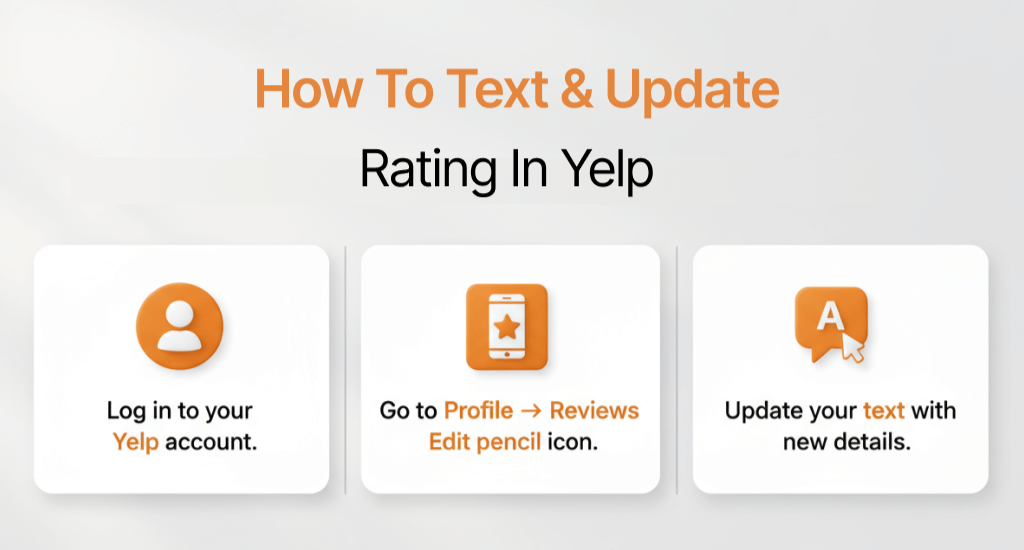
Step-by-Step: Edit Text & Update Rating
- Log in to your Yelp account.
- Go to Profile → Reviews → Edit (pencil icon).
- Update your text with new details.
- Adjust the star rating if your opinion has changed.
- Click Save to apply changes.
Edit Frequency & Transparency
Yelp lets you edit reviews multiple times. Each update is logged, so readers can see when changes happened. Keeping a “fair-update” tone is best; it shows honesty, helps businesses improve, and informs future customers. You should avoid rewriting to mislead or remove facts; transparency matters.
You can update your review instead of deleting it. It keeps your voice visible, accurate, and responsible while showing feedback that helps others.
Unable to Delete Yelp Review (Troubleshooting)
Sometimes you may try to remove a review and find that the delete does not work. If you are unable to delete a Yelp review (Troubleshooting), you might face technical or account issues.
To prevent visibility problems, you need to know how to respond to a suspicious 1-star review that isn’t from a client for managing similar public feedback challenges.
The steps below will help you identify the problem and fix it.
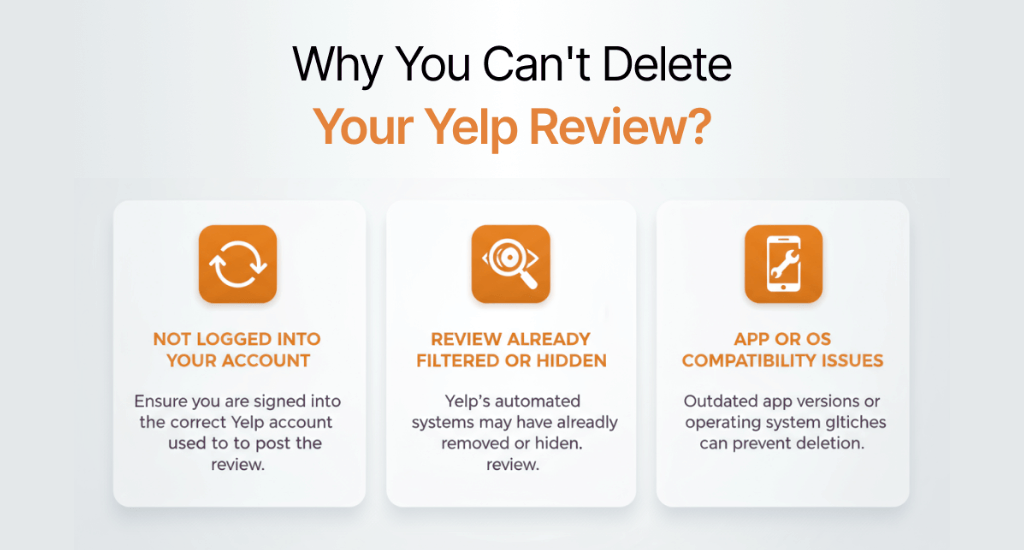
Common Reasons Deletion Fails
- Not logged into the posting account: You can only delete reviews from the account used to post them.
- Review already filtered or hidden: Yelp sometimes filters reviews for policy reasons; these may not show in the usual place.
- App/OS incompatibility: Older app versions or unsupported iOS/Android versions can block deletion.
Try to check these first before moving on.
Account Access Issues (Password / 2FA / Recovery)
If you cannot log in, verify your password, complete any two-factor authentication (2FA) prompts, and use account recovery if needed. Without proper access, deletion is impossible.
Contact Yelp Support
If deletion still fails, try to reach out to Yelp support. Include:
- Your account email
- Business name and review date
- Screenshot of the review
Support can guide you through account-specific or system problems.
Alternative Solutions
If deletion isn’t possible immediately:
- Edit the review to correct or remove sensitive info.
- Remove personal data without deleting the entire review.
- Delete your account as a last resort, which removes all reviews linked to it.
Following these steps ensures you can manage your content even if you are unable to delete a Yelp review directly. Proper troubleshooting saves time and keeps your account settings and privacy safe.
Yelp Review Deletion Policy & Arizona Legal Notes
Deleting a review should always be a thoughtful choice. Yelp review ethics encourage honesty, fairness, and safety for both users and businesses.
Ethical deletion keeps both users and businesses protected, and building transparent communication through paid marketing ensures your brand remains trusted even in competitive industries.
The following section explains when deletion is right, what the CRFA protects, and how Arizona consumer rights apply to online feedback.
When It’s Appropriate to Delete
You can delete your review anytime, but it’s best done for clear reasons:
- You posted to the wrong business.
- You shared private or unsafe details.
- You no longer feel comfortable keeping it public.
Delete a review only for the right reasons. It supports safety and accuracy, not pressure or unfair influence from others.
Consumer Review Fairness Act (CRFA) – Plain English
The CRFA is a U.S. law that protects your right to post honest reviews. A business cannot fine, threaten, or punish you for sharing truthful feedback. If anyone asks you to sign a “no negative review” or “gag” clause, it is not legal. You are free to express your real experience online anytime.
Arizona Context
In Arizona, consumers also have protections under state laws about fair trade and online conduct. Writing a truthful review is legal, but spreading false information that harms a business may count as defamation. It isn’t legal advice, just a reminder to stay factual and balanced when sharing opinions.
Impact on Businesses & Fair Updates
Good reviews and fair edits help businesses grow. If your issue was fixed, you should update your Yelp review instead of deleting it. A short “update note” like ‘They resolved my concern quickly’ builds trust for both sides. That tone shows respect, honesty, and community value, the hallmarks of strong online review ethics.
Alternatives to Deleting Your Review on Yelp
You don’t always need to remove your post. Sometimes a small update helps more than a full deletion. You can update a Yelp review, change the rating, or reply directly to a business listing. These options keep your voice visible while staying fair and accurate.
Update With New Information
If your experience changed, you should open the review editor and refresh your text. Add what happened after your first visit or note how the business responded. It keeps your review honest and current without losing history.
Adjust Your Rating After Resolution
You can change the star rating anytime. If the business fixed your concern or improved service, raising the rating shows fairness. If things got worse, lowering it is also fine. You just have to explain why for clarity.
Reply to Business Owner Comments
When a business replies politely to your review, you should answer if needed. A short response like “Thanks for addressing it” or “Appreciate the follow-up” shows balance. It helps other readers see both sides clearly.
Add Photos/Updates for Context
Adding photos or updating notes gives better context to your story. Try to show what has improved, or point out what still needs work. Visual updates are often more helpful than deleting the review completely.
Understanding Yelp’s Rules: What You Can and Can’t Do
Before editing or deleting your post, rules helps to know how Yelp’s content guidelines work. Yelp sets clear limits on what reviews are allowed and what breaks the Yelp review policy. If you know these basics, it will help you avoid mistakes and keep your feedback visible.
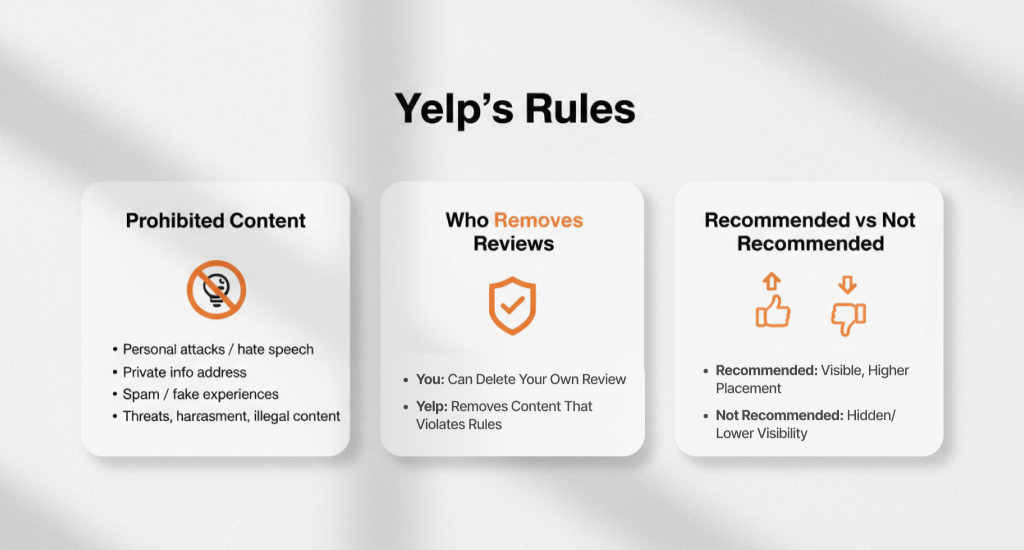
Prohibited Content & Violations
Yelp removes reviews that include:
- Personal attacks or hate speech
- Private information like phone numbers or addresses
- Spam or fake experiences
- Threats, harassment, or illegal material
These fall under prohibited content. Reviews that break these rules can be flagged by other users or removed by Yelp. You should always keep your review factual and respectful to stay within policy. For additional credibility, here is a checklist for marketing your local service business that can strengthen your brand authority.
What Yelp Removes (vs What You Remove)
Yelp can remove reviews that violate its rules. That’s a platform removal. When you delete your own review, that’s user removal. Both actions take the review off the business page, but only Yelp decides on policy-based deletions. You control your own posts, while Yelp moderates for fairness and safety.
Recommended vs Not Recommended Reviews (Filtering Impact)
Yelp uses a recommendations filter to decide which reviews appear first. Reviews from new or inactive users may be marked as “Not Recommended.” These still exist but appear lower or hidden.
Following Yelp’s content rules helps your review stay visible. Clear, honest, and balanced writing keeps it in the “Recommended” section, where more readers can see it.
Yelp Privacy & Account Management
Managing your privacy on Yelp is just as important as managing your reviews. You can adjust privacy settings, limit what others see on your Yelp profile, or even delete your Yelp account completely. You should grasp these options; they will help you control your information and your review visibility.
Make Your Profile More Private
If you want more privacy without deleting your account, open Account Settings → Privacy Settings. From there, you can:
- Hide parts of your public profile.
- Limit how much personal info is visible.
- Turn off location sharing.
These steps can keep your profile active but more secure.
Delete Your Entire Yelp Account (Implications)
If you choose to delete your Yelp account, remember that it removes everything, like your profile, reviews, photos, and saved content. Yelp will ask for confirmation before closing it. Once deleted, recovery is not possible.
It is a permanent step, so take screenshots of your reviews or notes before proceeding. It’s best used only if you no longer want to stay on Yelp at all.
Data & Digital Footprint
Even after deletion, copies of your reviews might remain in screenshots or web archives taken by others. That’s the reality of the internet: some traces may stay visible elsewhere.
To protect your data, you should review what you share. Also, you should avoid private details and stay careful with personal photos. Smart privacy habits can help you stay in control even beyond Yelp.
How Long Does It Take for a Deleted Yelp Review to Disappear?
After you delete a review, it usually vanishes from your Yelp profile instantly. On the business page, though, it can take a few hours to update fully. This short delay happens because Yelp’s servers store temporary copies of page data.
If your review still appears, don’t worry. Log out, clear your browser cache, or refresh the page later. Once the system refreshes, the review will disappear from both pages.
Fixing Common Error Messages While Deleting a Yelp Review
Sometimes, Yelp shows small errors when deletion doesn’t go through. Here’s what they mean and how to fix them:
- “Action Failed” – Refresh your connection, clear your cache, then retry.
- “Review Not Found” – The post may already be filtered or removed.
- “Request Timeout” – Your network slowed down, or the app froze.
If these steps don’t help, you should take a screenshot of the message and share it with Yelp Support.
Can You Delete Multiple Yelp Reviews at Once?
Yelp does not permit bulk deletion. Each review must be deleted separately to prevent mistakes or spam misuse. It may take more time, but it keeps your account secure.
Before removing several posts, you should make a small list, save screenshots for your record, and go step by step. That way, you can stay organized and avoid removing the wrong review.
Does Deleting Reviews Affect Your Yelp Elite Status or Credibility?
Deleting a few reviews won’t harm your reputation or Yelp Elite badge. What matters most is how helpful and honest your reviews are.
If you remove many posts at once, your activity score may dip slightly. Instead of deleting everything, you should try editing or updating older reviews. It keeps your profile strong and trustworthy over time.
End Up
Deleting a Yelp review is simple once you understand the right steps for how to delete a Yelp review you posted on your device and account settings. Whether you’re using the iPhone app, Android, or desktop, following Yelp’s policies ensures your review history stays clean and accurate.
Before deleting, you should consider editing or updating your experience. It maintains credibility while reflecting your honesty. Thoughtful updates help businesses grow and make Yelp a more reliable space for everyone.